0%

How Teraflow works for a therapy clinic.

Each document below comes from the demo clinic, with the steps the Teraflow agent takes to prepare it. After them, how a clinic starts.

The documents Teraflow prepares

Plan of care

The plan says which therapy the child gets, toward which goals and for how many hours a week. The referring physician signs it, and the payer’s authorization is asked from it.
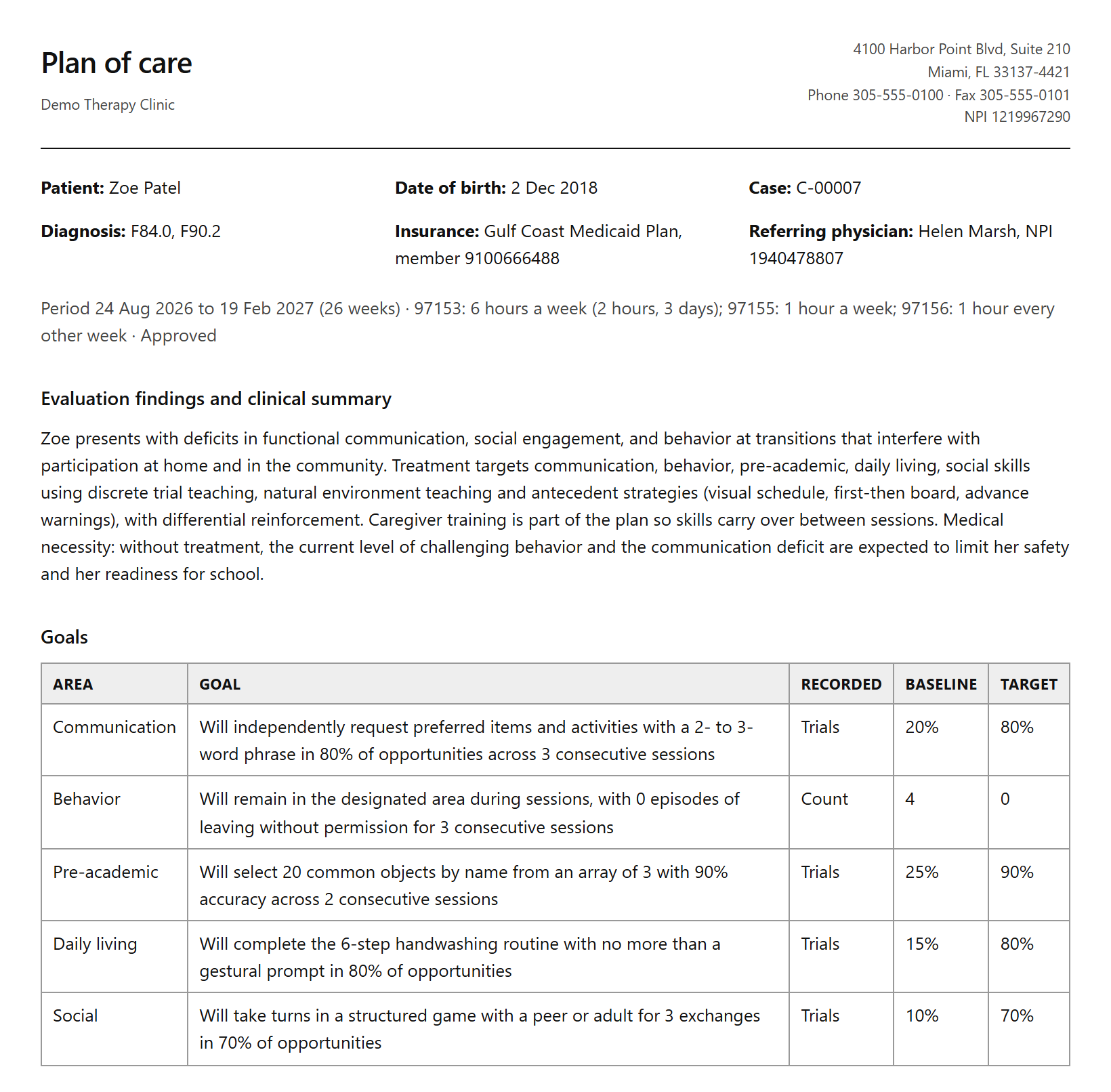
The top of a printed plan of care: the clinic’s letterhead, the patient, diagnosis, insurance and referring physician, the plan period and weekly hours, the clinical summary and the goals with baseline and target.
From the demo clinic. Everyone in it is made up. Open the full picture
The evaluation is done
When the evaluation is completed and the case has no plan yet, the Teraflow agent gives the case’s supervisor a task to write one.
The draft starts
The plan starts on the day of the evaluation and runs 180 days, or the length your clinic sets.
Assessment and goals
The supervisor rates the child on the skills in your clinic’s library, one tap each on a scale from 0 to 4. Another tap turns a skill the child does not have yet into a goal, worded as the library words it, with how it is recorded, a target and a baseline worked out from the rating. The supervisor can also write goals of their own, and writes the evaluation findings and clinical summary.
Services and hours
The supervisor lists the services to request with their units per week. Teraflow works out the hours a week, the units for the whole plan and the frequency line the plan prints, such as “97153: 6 hours a week”.
Sent to the physician
“Save and send to physician” sends the plan with the patient, the diagnosis, the period, the summary, the goals, the services and a line for the physician’s signature. Where your clinic connects its fax service, it goes to the referring physician’s fax number by itself. Without one, it waits in Inbox > To send for your staff.
The signed copy comes back
When the physician’s signed plan comes back, your staff file it on the case and pick it as the signed copy, and only then is the plan approved. While the plan is out, your staff get a task to follow up once your clinic’s reminder wait has passed.
Authorizations from the plan
Where your clinic switches this step on, the agent writes the authorization requests from the approved plan: for each service that needs one, its units per week times the weeks the plan and the insurance both cover. Where your clearinghouse’s mailbox takes 278 requests (Availity’s does), “Ask the payer” sends the request and the payer’s answer fills in the authorization. Elsewhere your staff ask by portal, fax or phone and type in the answer.
Hours against the authorization
Each session counts against its authorization, and the case shows the units used and left. The supervisor gets a task when an authorization ends within 30 days or has a fifth of its units left. Both points are settings.
Kept up during the plan
From a session, therapists ask for changes: a goal mastered, a new target, a new step or a new goal. The supervisor approves or declines each one, and an approved change goes into the plan at once. When a goal has been at its target for the sessions in a row the plan asks for, the supervisor sees it and decides whether it is mastered.
Revised or renewed
A plan that needs more than that is reopened as a draft, revised and sent to sign again. Thirty days before a plan ends (a setting), the supervisor gets a task to write the next one. It starts on the day of the latest re-evaluation, when there is one, and carries over the current goals, each with its latest recorded value as the new baseline, and the services.
CMS-1500 claim

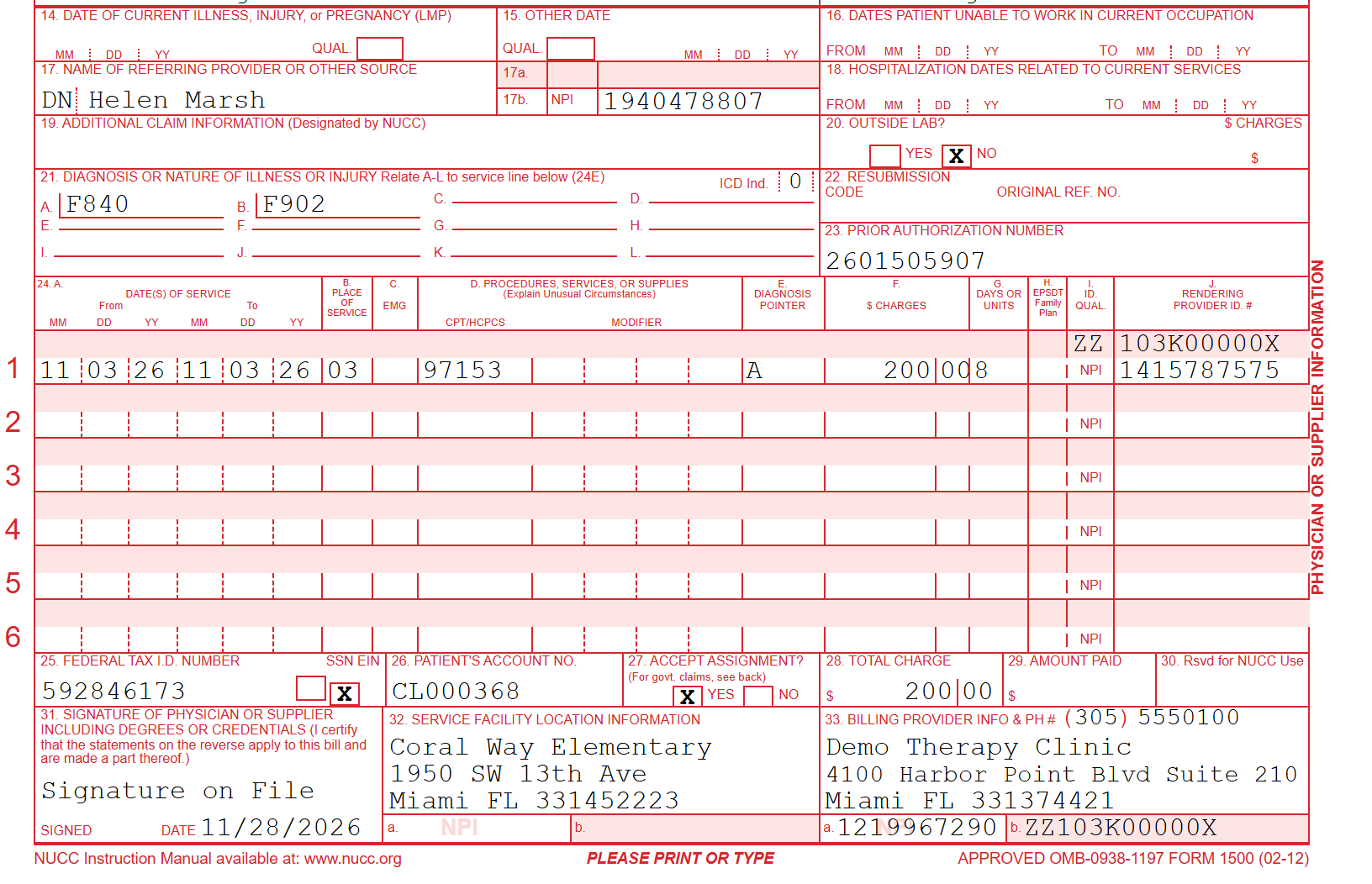
A completed session becomes a claim. Most payers get it as an 837P file through your clearinghouse. Payers that take paper get the CMS-1500, filled in box by box from the same data.

The lower half of a printed CMS-1500 claim form: the referring provider and NPI, two diagnosis codes, the prior authorization number, a service line for 97153 with 8 units and $200.00, the tax ID, the total charge, the service facility and the billing provider.
From the demo clinic. Everyone in it is made up. Open the full picture
The session is completed
With note rules picked for the payer, a session completes only when its note has every part those rules ask for. It becomes a claim line by itself, with the service’s code, the units counted from the minutes by that payer’s rounding rule, the rendering NPI and the authorization number.
Checked before it leaves
The claim is held until nothing is missing: the payer’s ID, the subscriber, the patient’s address, diagnosis codes in ICD-10 form, a valid NPI, an authorization that covers the day and the units, and the parent’s and supervisor’s signatures where they are required. Your biller gets a task that names the gap.
A note corrected by an addendum
A signed note is never edited. A correction is added as a signed addendum with its reason. When it changes the times or the service, billing gets a task, and the claim waits until that is settled.
Filed
Where your clinic switches it on and connects its clearinghouse, ready claims leave together in one 837P file, and Teraflow visits the clearinghouse’s mailbox every half hour. A paper claim prints with the form on plain paper, or as data alone for red-ink forms.
Followed to an answer
The 999 and 277CA acknowledgements are filed on the claim with the payer’s claim number. When a payer accepts a claim and then stays quiet for the days you set, Teraflow asks where it stands with a 276 request where your clearinghouse takes them, or gives your biller a task. A claim close to its filing deadline is marked.

Remittance

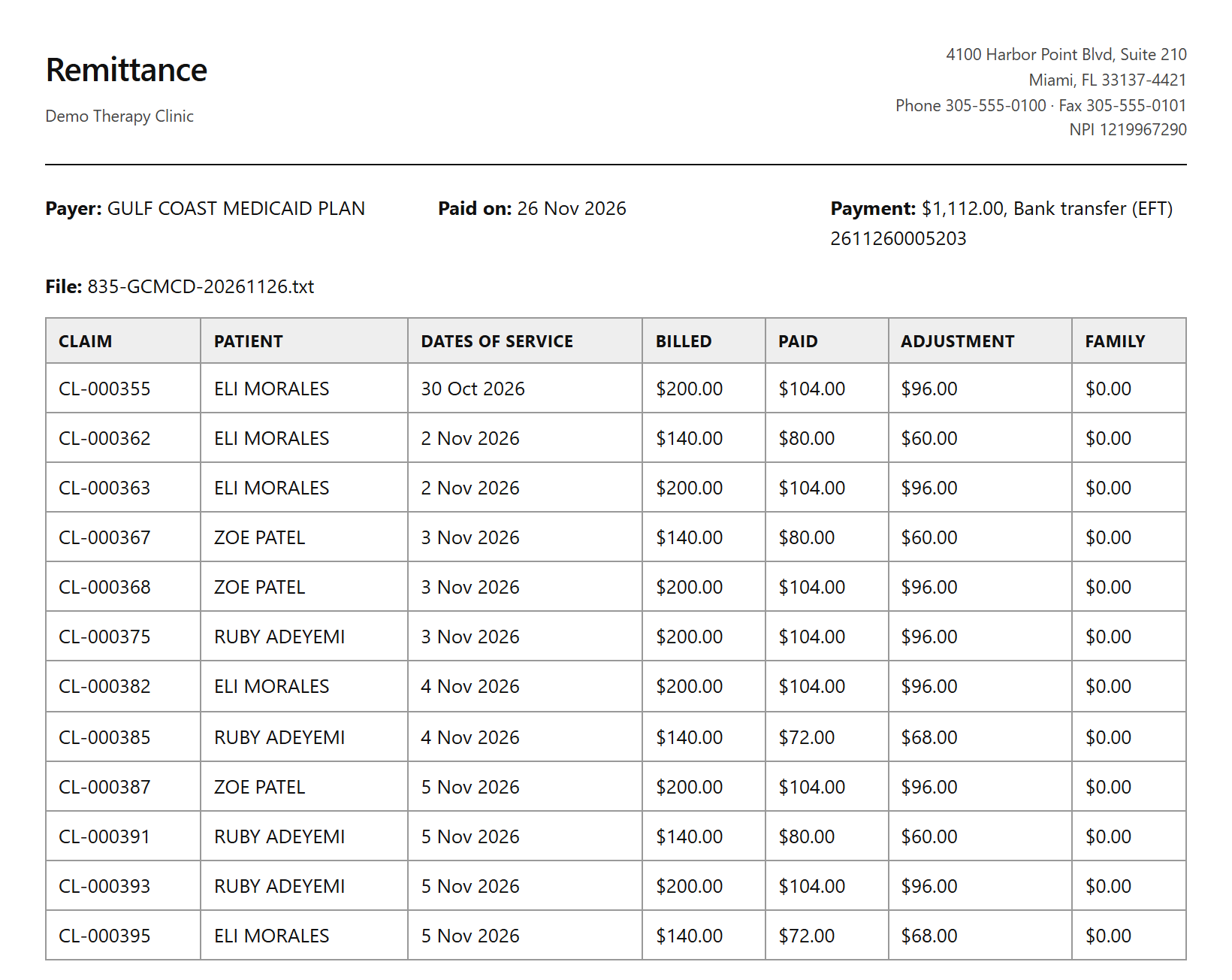
The remittance is the payer’s answer with the money: what it paid on each claim, what it adjusted and why, and what it left to the family.

The top of a printed remittance: the payer, the payment date, an EFT payment of $1,112.00 and its trace number, then twelve claims with billed, paid, adjustment and family amounts.
From the demo clinic. Everyone in it is made up. Open the full picture
The 835 arrives
Payments come back as 835 files in the same clearinghouse mailbox. The agent posts each one line by line: the payment, the adjustments with the payer’s reason codes, and the family’s share.
Paid or denied
A claim paid in full closes itself. A denied claim shows the payer’s reason codes in plain words with what to correct, and lands on your biller’s task list.
Payments that fit no claim
A payment that fits no claim waits beside the claims it most likely belongs to, to post with one click. Each payment is checked against what was posted.
The second payer and the family
When the first payer leaves a balance, Teraflow makes the secondary claim with the first payer’s decision on each line. What is left to the family goes onto their statement, and where your clinic connects card payments they pay it from their phone.

Papers that come in

Referrals, signed plans and family documents arrive all the time. Each one has to end up on the right case.

Referrals
With referral reading switched on, the agent reads each faxed or emailed referral, opens the case and files the referral in it.
From families
What a family sends through its link is filed on its own case. Where you hand document review to the agent, it checks each upload and sends a blurry photo back with a note on what to send.
Everything else
Other faxes and emails, such as the physician’s signed plan, wait in the inbox until your staff file each one on its case with its type.

How a clinic starts

  1. Join the waitlist

    You tell us about the clinic

    Leave your name, work email and clinic name on the waitlist form, and a phone number if you would like a call. We answer by email.

  2. Your workspace is created

    We set it up

    When your turn comes, your clinic gets a workspace at its own address, with a database of its own. You are its first administrator, and you sign in to it from this website.

  3. Setup, one question at a time

    You answer, a screen at a time

    The first sign-in opens a setup that asks one thing per screen: the clinic’s name, address and billing numbers, your services and their codes, your payers, your people, the documents every case needs and how families are reached. Leave at any point; what you did is kept.

  4. Connect what you already use

    In settings, when you are ready

    Your clearinghouse, your fax number, your email and card payments are connected in settings. Until one of them is connected, that step is done by hand on the same screen.

  5. Bring in your team and your families

    Roles for staff, a link per family

    Add your staff with roles that decide what each person may see. Each family gets a private link for their child.

Start with Teraflow

Join the waitlistTell us about your clinicClinic loginOpen your clinic’s workspace